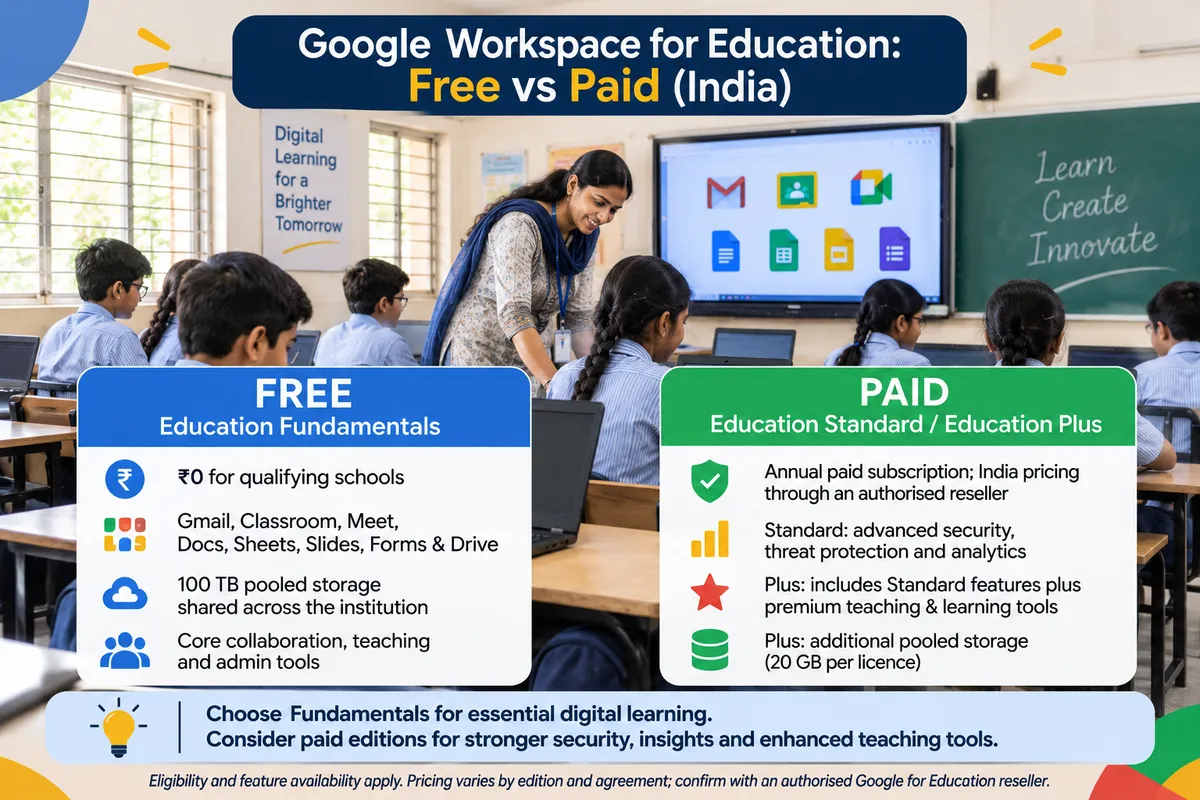
Google Workspace for Education India: Free vs Paid
For most Indian schools, Google Workspace for Education Fundamentals is free, and it already covers Gmail, Drive, Docs, Classroom and Meet. The paid options (Education Plus, and the Teaching and Learning add-on) are licensed per user per year and make sense only when you need larger Meet calls, stronger security controls or unlimited originality checking.
This guide explains who qualifies for the free tier, what the paid tiers add, how Google licenses them, and how to decide without overspending. It is written for principals and administrators, not for IT engineers.
Who qualifies for the free tier
Google's published criteria for Education Fundamentals are about the institution, not its board or fee level. A school qualifies if it is government-recognised and accredited, delivers instruction to students, has an active website, and is represented by someone who belongs to the school.
Qualifies: accredited K-12 schools, including CBSE, ICSE and state-board schools that are recognised in India
Needs a separate domain: a school that also runs other operations, such as a trust's business activity, must set up a separate domain for the school itself
Does not qualify: organisations that are not schools, even if they serve students. Google's own list includes tutoring programs and language schools
Google reserves the right to decide eligibility, so treat approval as a decision you apply for, not a guarantee. Google partners in India report that applicants are usually asked for an affiliation certificate and proof that the school owns its domain, but the exact checklist is Google's to set. Read the current rules on Google's Workspace for Education qualifications page before you apply.
If you run a coaching class, the news is less good. Tutoring programs fall outside Google's eligible list, so coaching centres normally look at the standard paid Workspace business plans instead.
What you get free with Education Fundamentals
Fundamentals is a full working suite, not a trial. According to Google's editions page, it includes:
Classroom, Gmail, Drive, Docs, Sheets, Slides, Forms, Sites, Calendar, Chat and Meet
100 TB of storage pooled across the whole organisation
Meet calls of up to 100 participants
The standard admin and security tools in the Google Admin console
Gemini for Education with enterprise data protection, with limited Gemini access inside the apps (availability can vary by country and by user age, so check your admin console)
For a typical school the free tier covers daily classwork, homework collection, parent communication and staff email. Many schools never need to pay for anything.
Google also offers two free licence types that help with cost control: Gmail Only for users who do not need the full suite, and Archive User for former staff or students. Assigning them frees up Fundamentals licences for active users.
What the paid tiers add
Education Plus (paid, annual)
Meet calls of up to 1,000 participants, useful for whole-school assemblies and parent webinars
Advanced security and insights for the Admin console
Storage of 20 GB per licence on top of the 100 TB pool
Unlimited originality reports with peer comparison in Classroom, against 5 reports per class on Fundamentals
Premium Gemini features in Docs, Sheets, Slides, Vids and Forms
Teaching and Learning add-on (paid, per licence)
Premium teaching and learning tools layered on Fundamentals
An extra 100 GB of pooled storage per staff licence
Designed for schools that want better classroom tools for teachers without buying the full Plus bundle
Education Standard
Google's licensing page still names Standard, but lists no price for it, and some resellers have reported that it is being discontinued, leaving Plus as the main paid edition
Because Google's own pages do not agree, ask your reseller in writing whether Standard is still sold before you plan around it
How Google licenses the paid options
This is where schools get surprised, so read it before you ask for a quote. Google's pricing page sets these rules.
Per user, per year: licences are per user. Every active user needs a Fundamentals licence first.
All or nothing for Plus and Standard: a paid Standard or Plus licence must cover every user who holds Fundamentals. You cannot buy it for staff only.
A minimum of 50: institutions with fewer than 50 total users must still buy at least 50 licences.
No more free staff licences: the old rule of one free staff licence for every four paid student licences has ended.
Commitment: annual plans auto-renew for 12 months. Early cancellation means paying the remaining commitment, with no refunds in the term.
Multi-year discounts: Plus offers automatic discounts for two- or three-year contracts, and the price stays fixed for the term.
Google lists suggested prices in US dollars: Education Plus at about $6 per user per year and the Teaching and Learning add-on at about $60 per user per year (Google's published MSRP, which resellers can discount). We have not been able to confirm a Google-published rupee price, so ask your reseller for a written INR quote, and remember that GST applies on top. Do not rely on any table of rupee prices you find elsewhere unless it comes from a quote with your school's name on it.
A simple way to decide
Rule of thumb: start on free Fundamentals for a full term. Only pay for something when you can name the specific limit you hit, such as a call bigger than 100 people, a security audit requirement, or teachers running out of originality reports.
Stay on free Fundamentals if
You mainly need email, Classroom, Drive and Meet for classes of under 100 people
Your IT is one coordinator and a vendor, and nobody will use advanced security reports
Teachers use originality checks occasionally, not on every assignment
Look at the Teaching and Learning add-on if
A group of teachers uses Classroom daily and needs more than 5 originality reports per class
You want to pay for a subset of staff licences instead of the whole school
Look at Education Plus if
You hold whole-school or parent events above 100 participants
Your trust or board requires the stronger security and audit tools
You are willing to license every user, and you have a quote that makes the arithmetic work
Setup mistakes that cost schools time
Using a personal Gmail account as the school identity. Register a school-owned domain first, because Google verifies domain ownership.
Letting the vendor own the admin account. The super-admin should be a named school role, with a backup. Staff changes should not lock you out.
Creating accounts before deciding on naming rules. Changing student email formats later is painful.
Ignoring the classroom hardware. Classroom and Meet depend on network, panels and cameras working. Our posts on school Wi-Fi network design and hybrid classroom setups cover what has to be in place.
Where this fits in a smart classroom plan
Software choices only help when each room can run them. A teacher who opens Classroom or Meet needs a screen, audio and a stable connection. If you are planning that hardware, see smart classroom setup cost in India and all about smart classrooms, and design the room around the way teachers will actually use these tools.
Before you buy: ask your reseller to confirm in writing which edition names are on sale today, the number of licences required, the rupee price with GST, the renewal date, and who holds the admin account.
Frequently Asked Questions
Is Google Workspace for Education free for schools in India?
Education Fundamentals is free for qualifying institutions, which Google defines as government-recognised, accredited schools that teach students and have an active website. Many CBSE, ICSE and state-board schools can apply. Google decides eligibility, so approval is not guaranteed. Paid editions such as Education Plus are optional and are licensed per user per year.
Can coaching classes get Google Workspace for Education for free?
Probably not. Google's qualification rules exclude tutoring programs and organisations that are not schools, even if they serve students. Coaching centres usually need a paid Google Workspace business plan instead. Check Google's current eligibility page, because Google reserves the right to decide who qualifies.
What is the difference between Education Fundamentals and Education Plus?
Fundamentals is the free base suite with Classroom, Gmail, Drive, Docs and Meet for up to 100 participants. Plus is a paid annual edition that adds Meet calls of up to 1,000 people, advanced security, unlimited originality reports with peer comparison, and premium Gemini features. Plus must cover every user who has Fundamentals.
How much does Google Workspace for Education cost per student?
Fundamentals costs nothing. Google's suggested price for Education Plus is about $6 per user per year, and about $60 per user per year for the Teaching and Learning add-on, before reseller discounts and Indian GST. Ask a reseller for a written rupee quote, since we could not confirm a Google-published INR price.
Is there a minimum number of licences to buy?
Yes, for paid editions. Google's pricing page says institutions with fewer than 50 total users must buy at least 50 licences. Paid Standard or Plus licences must also cover every user holding Education Fundamentals, so you cannot license only a few teachers on those editions. The Teaching and Learning add-on works differently, so confirm the terms.
Does the school need its own domain to apply?
Yes, in practice. Google verifies domain ownership, and a school that also runs non-educational operations must use a separate domain for the school. Register a school-owned domain first, keep the registrar login with the school, and avoid using personal Gmail accounts as the school identity.
Planning classrooms that actually use these tools?
AVM Infotech helps schools plan the panels, audio, network and room design that Classroom and Meet depend on. Call us and we will tell you honestly what your classrooms need and what they do not.

